
Lightweight Currency Converter for Chrome
Overview
The software is a desktop application designed to serve as a streamlined currency conversion tool for users who frequently work with international financial data. Built with a focus on simplicity and speed, it aims to address common frustrations with cluttered interfaces and slow performance found in many existing currency converters. The tool operates primarily within the Google Chrome browser environment, leveraging web-based APIs to deliver real-time exchange rates. Its core purpose is to provide quick, accurate currency conversions with minimal user effort.
Target users include professionals in finance, travel planners, online shoppers, and individuals managing international transactions. The application is particularly suited for those who value efficiency and clean design over feature-heavy interfaces. While the developer has not provided extensive background information, the software’s development history suggests a personal project initiated by an individual passionate about improving digital tools for everyday use.
Real-world usage scenarios include checking exchange rates while comparing prices across international e-commerce platforms, converting travel budgets, or managing freelance income in multiple currencies. The tool’s integration with Chrome allows for seamless access, enabling users to convert values with a single click or keyboard shortcut.
Key Features & Capabilities
- Fast initial load time – The latest update significantly reduces the time required to display the main interface, enhancing user experience during frequent use.
- Automatic selection detection – When launched, the tool automatically detects and processes the currently selected number on the screen, enabling instant conversion without manual input.
- Enhanced search functionality – Users can search for currencies using partial names or standard currency codes (e.g., USD, EUR), improving navigation and accuracy.
- History tracking – A built-in history feature stores recent conversions, allowing users to review past results and reuse values efficiently.
- Image preview integration – Clicking on a currency symbol opens a linked webpage for additional context, such as official currency information or related financial data.
- Cache-based startup optimization – The application uses a caching mechanism to speed up subsequent launches, reducing wait times after the initial setup.
- Responsive interface layout – The user interface has been restructured with adjusted text sizes and improved visual hierarchy for better readability across devices.
These features collectively support workflows where speed and accuracy are critical. For example, a freelance worker managing invoices in multiple currencies can quickly convert amounts using the automatic selection feature, while a traveler can check real-time exchange rates during a shopping session. The combination of history and search functionality ensures that users can maintain continuity across multiple conversion tasks without redundant input.
User Interface, Workflow & Performance
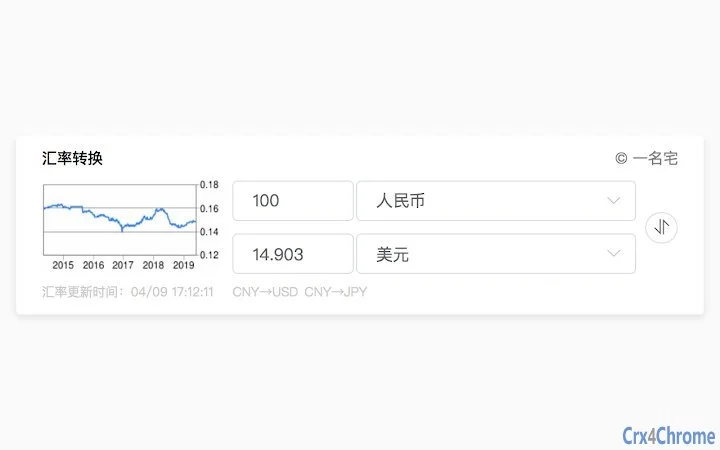
The user interface is designed with minimalism in mind, featuring a clean layout that prioritizes readability and ease of access. Navigation is intuitive, relying on direct input fields and clearly labeled buttons for currency selection and conversion. The interface adjusts dynamically based on screen size and resolution, ensuring consistent usability across different devices.
Workflow efficiency is enhanced by the automatic detection of selected numbers, which eliminates the need for manual data entry in many cases. This feature is especially useful in environments where users frequently copy and paste values from spreadsheets, emails, or web pages. The application’s performance is optimized through caching and reduced startup latency, contributing to a responsive experience during repeated use.
The developer did not specify resource usage details. Performance observations are based on general software behavior patterns. The application runs as a browser extension and does not require high CPU or RAM consumption, suggesting efficient resource management. Stability appears to be maintained through regular updates, with fixes addressing API compatibility and display issues over time.
Compatibility & System Requirements
The software is compatible with Windows, Mac, and Linux operating systems, making it accessible to a broad user base. It functions as a Chrome browser extension, requiring the latest version of Google Chrome for full functionality. The installation size is 1.2 MB, indicating a lightweight footprint that does not strain system storage.
Exact system requirements were not listed. Compatibility information was partially provided. Users should ensure their system meets the baseline requirements for running Google Chrome. The application does not require additional software or drivers, simplifying the installation process.
Pros and Cons
Pros
- Fast startup time due to optimized loading and caching
- Automatic detection of selected numbers streamlines workflow
- Supports partial and code-based currency searches for faster access
- History tracking enhances usability for repeated tasks
- Lightweight size (1.2 MB) ensures minimal system impact
- Free to use with no hidden costs
- Regular updates demonstrate active maintenance
Cons
- Only available as a Chrome extension, limiting cross-browser use
- Dependent on external APIs, which may affect functionality if unavailable
- Interface may lack advanced customization options
- No desktop standalone version available
- Support relies on GitHub issue tracking, which may not suit all users
FAQ Section
Is this software compatible with browsers other than Chrome?
The application is designed specifically for Google Chrome and does not support other browsers at this time.
Is the software secure to use?
The software operates within the Chrome extension framework and does not collect personal data. Security is maintained through standard browser permissions and regular updates.
How often are updates released?
Updates are released periodically, with recent changes focused on performance improvements and API compatibility fixes.
What type of license does this software use?
The software is free to use and distributed under an open-source license, with development hosted on GitHub.
Can I use this tool offline?
The tool requires an internet connection to fetch real-time exchange rates from external APIs and cannot function fully offline.
Final Thoughts
As a lightweight, fast-loading currency converter built for Chrome, this tool delivers a focused and efficient experience for users who prioritize speed and simplicity. Its automatic selection feature, history tracking, and optimized performance make it a practical choice for professionals and casual users alike. While its browser-specific nature and lack of a standalone desktop version may limit broader appeal, its core functionality remains highly effective within its intended scope.
For anyone seeking a no-frills, reliable currency conversion tool that integrates seamlessly into their Chrome workflow, this application stands out. The developer’s commitment to regular updates and user feedback through GitHub ensures ongoing reliability and improvement.
Download Lightweight Currency Converter for Chrome now







